
Equali supports both single and multi-store Shopify setups. Your subscription type determines how many Shopify stores you can connect to your Equali organisation:
-
Lite: 1 store
-
Pro: Up to 3 stores
- Premium: Up to 5 stores
Click here to find out more about how to manage your Equali subscription.
How to set up another Shopify Store
- Step 1: Click on your name at the top right of the Equali dashboard.
- Step 2: On the dropdown, click "My Organisation".
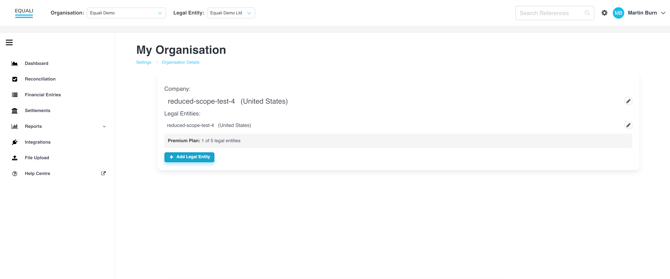
- Step 3: Check the legal entities connected with your organisation. If your Shopify store is already listed, skip to step 5.
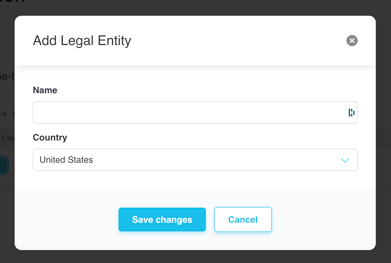
- Step 4: To add a new legal entity (store), click the "Add Legal Entity" button and fill in the "Name" and "Country".
- Step 5: Navigate to the "Integrations" page using the navigation bar on the left side of the Equali dashboard.
- Step 6: Select your new legal entity by using the "Legal Entity" dropdown at the top of the Equali dashboard.
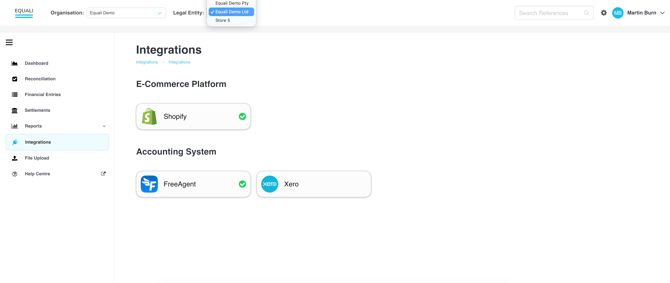
- Step 7: Click on the Shopify integration, then click the "Connect Shopify" button. You will then go through the Shopify app installation process for the new store.