
Equali supports both single and multi-entity setups. Your subscription type determines how many "Legal Entities" you can connect to your Equali organisation:
-
Lite: 1 legal entity
-
Pro: Up to 3 legal entities
- Premium: Up to 5 legal entities
Click here to find out more about how to manage your Equali subscription.
How to set up another Legal Entity
- Step 1: Click on your name at the top right of the Equali dashboard.
- Step 2: On the dropdown, click "My Organisation".
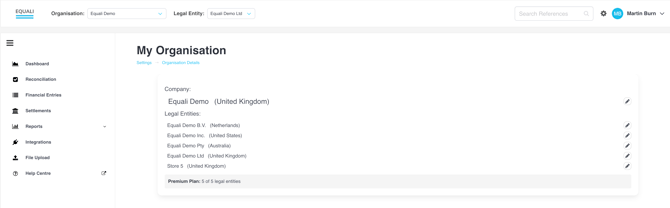
- Step 3: Check the legal entities connected with your organisation. If your legal entity is already listed, you do not need to do anything else.
- Step 4: To add a new legal entity, click the "Add Legal Entity" button and fill in the "Name" and "Country".
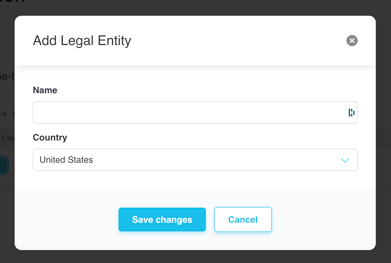
Your new legal entity will now be included in the list of legal entities underneath your organisation.
Switching to another Legal Entity
To switch to another legal entity, click the "Legal Entity" dropdown from the top of the Equali dashboard and select the entity you would like to view. For more information, click here.