
Equali sets up FreeAgent "bank accounts" and "bank fees" with FreeAgent, allowing you to post settlements as bank transactions with a categorised breakdown as bank transaction explanations. Only "eCommerce" type bank accounts are displayed in Equali.
What is a default bank account
A default bank account is one that can be used to pre-populate the bank account field for settlement posting to FreeAgent. It can also be used to set up automated settlement posting.
A default bank account is associated with a single legal entity (store), PSP (e.g. Shopify Payments) and settlement currency combination (e.g. GBP). This keeps your accounting and reporting in FreeAgent separate, and means you can easily track bank transactions and bank transaction explanations.
Example:
-
Bank Account "123": Store 1; Shopify Payments; GBP
-
Bank Account "124": Store 1; Shopify Payments; USD
-
Bank Account "125": Store 2; Shopify Payments; GBP
Setting a default bank account
-
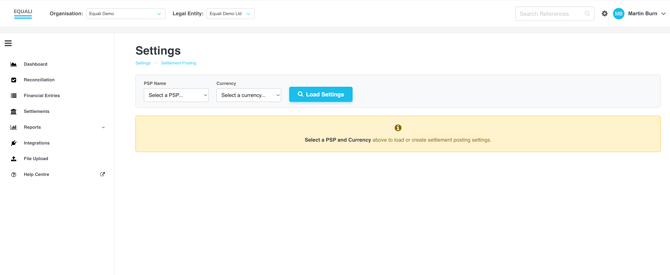
Step 1: Navigate to the "Settings" page by clicking the cog icon between your profile and the search bar at the top right of the Equali dashboard.
-
Step 2: Once you're on the "Settings" page, make sure you're viewing the legal entity you would like to update by checking the "Legal Entity" dropdown at the top of the Equali dashboard.
-
Step 3: Select a "PSP" and "Settlement Currency" from the respective dropdown menus on the page. Both of these dropdown menus are populated based on the data we have received from your data sources, both from our regular BAU runs and any backfilled data from your trial or subscription plan. Next, click the "Load Settings" button.
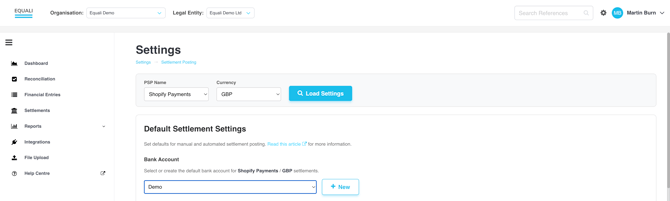
- Step 4: The "Default Settlement Settings" table will appear for your chosen legal entity, PSP, settlement currency combination. In the table, you will see a link to this page, which gives more information about Default Settlement Settings. Underneath that link is the "Default Bank Account" for that profile.
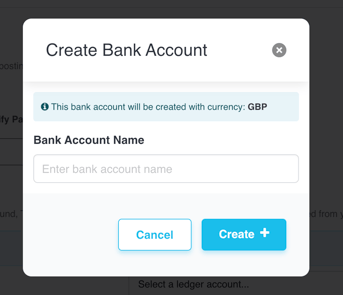
- Step 5: To add a default bank account to your chosen profile, select from the dropdown or click "New" to create a new bank account to choose from the dropdown.
- Note: Only "eCommerce" type bank accounts can be selected. It is not possible to create an eCommerce type bank account in your FreeAgent account.
- You must create an eCommerce type bank account in the Equali dashboard. It is not possible to create a non-eCommerce type bank account from the Equali dashboard.
-
Step 6: If you have created a new bank account, make sure it is selected in the dropdown, as shown with our "Demo" bank account in the below screenshot.
- Step 7: Once finished, click on the "Save Settings" button at the bottom of the page. Your profile will be used as outlined below.
Results
- Automated settlement posting: Any settlements for that profile (legal entity, PSP, settlement currency combination) will automatically use your default bank account to post to FreeAgent when automated settlement posting is switched on and all other automated settlement posting criteria are met for a given settlement. Having a default bank account for a given profile is a requirement for any automated settlement posting.
-
Manual settlement posting: Any settlements on the "Settlements" page for that profile (legal entity, PSP, settlement currency combination) will automatically use your default bank account to pre-populate the bank account field when connected to FreeAgent. This speeds up the manual settlement posting process from the dashboard.