
Equali supports zero-touch automated settlement posting when all mandatory steps are passed. One of these steps is that you must setup automated settlement posting in the dashboard. This article outlines the steps to switch it on.
Note: you can only set up automated settlement posting for one legal entity/store, PSP and settlement currency combination at a time. Please take time to set up each profile correctly and make sure you're happy with automated settlements before switching it on.
Switching on automated settlement posting for a profile
-
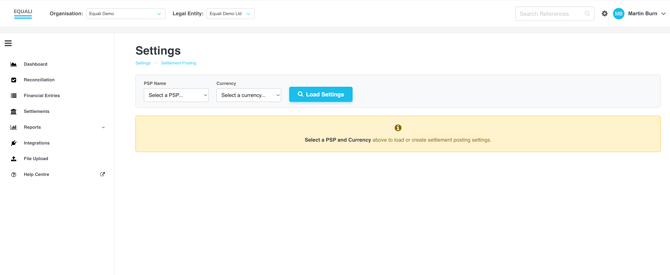
Step 1: Navigate to the "Settings" page by clicking the cog icon between your profile and the search bar at the top right of the Equali dashboard.
-
Step 2: Once you're on the "Settings" page, make sure you're viewing the legal entity you would like to update by checking the "Legal Entity" dropdown at the top of the Equali dashboard.
-
Step 3: Select a "PSP" and "Settlement Currency" from the respective dropdown menus on the page. Both of these dropdown menus are populated based on the data we have received from your data sources, both from our regular BAU runs and any backfilled data from your trial or subscription plan. Next, click the "Load Settings" button.
- Step 4: Scroll to the bottom of the Settings page until you reach the "Automated Settlement Posting" section. Check the legal entity you're viewing by looking at the "Legal Entity" dropdown at the top of the Equali dashboard, and then check the bold text in the description to make sure you're setting up the correct profile ([PSP] / [Settlement Currency]).
- Step 5: Once you're happy with your selection, click the tick box to enable automated settlement posting. The box will show as ticked, with a green background.
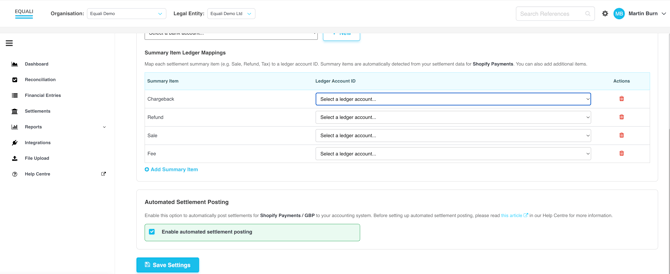
Note: Automated settlement posting requires several checks to pass before anything is posted to your accounting system. If you have checked the Automated Settlement Posting box but another check fails, all users associated with your organisation will receive an email notification outlining the reason the post was not successful. Once a settlement post fails once, you must post it manually from the Settlements page in the dashboard. Click here for more information about manual settlement posting.
Automated settlement posting is currently only available for FreeAgent customers.