
The Settlements page on the Equali dashboard gives you a list of every settlement from your payment providers, breaking down each into categorised entries that you can post to your accounting system.
To visit the Settlements page, click on the "Settlements" link on the navigation bar on the left side of the Equali dashboard.
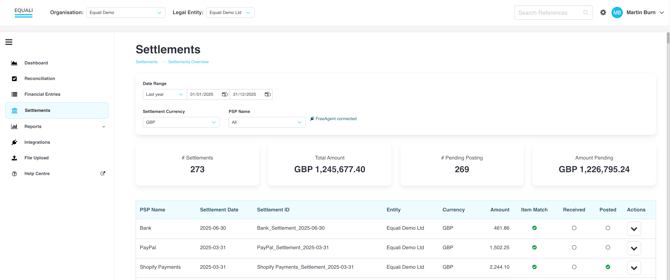
Filters
Use the filters on the settlements page to show all of the settlements based on several criteria, including:
- Date range (date of the settlement being created by the payment provider, not necessarily the date the settlement reaches your bank account)
- Settlement Currency (e.g. GBP, USD, EUR)
- PSP Name (e.g. Shopify Payments, Stripe)
If your settlement currency or PSP are not listed, please contact the Equali team using the support form.
KPI Numbers
Several KPI numbers are provided as a summary underneath your filters. Your chosen filters will update the KPI numbers accordingly (and settlement currency prefixes). The following KPI numbers are shown:
- Number of settlements
- Total amount of settlements (in the settlement currency)
- Number of settlements pending posting
- Total amount of settlements pending posting
Settlements Table
The settlements table shows every settlement matching your chosen filters. Clicking on any row opens up more details about the settlement, and opens up the actions "View Ledger" (to see all related financial entries) and "Post" (to manually post to your accounting system).