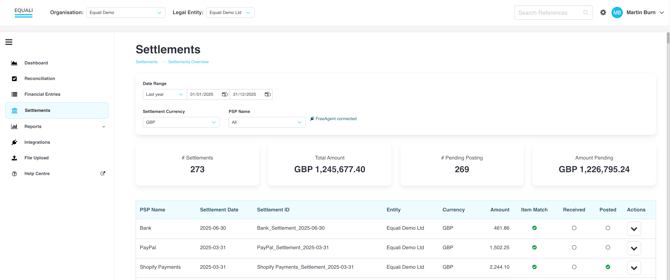
The Settlements page on the Equali dashboard gives you a list of every settlement from your payment providers, breaking down each into categorised entries that you can post to your accounting system.
To visit the Settlements page, click on the "Settlements" link on the navigation bar on the left side of the Equali dashboard.
Viewing a settlement's financial entries
-
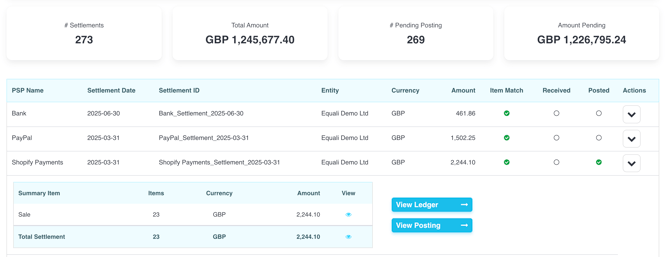
Step 1: On the Settlements page, click on any row to open up more details about the settlement and open up the actions: "View Ledger" (to see all related financial entries) and "Post" (to manually post to your accounting system).
-
Step 2: To view all financial entries related to a settlement, click the "View Ledger" button.
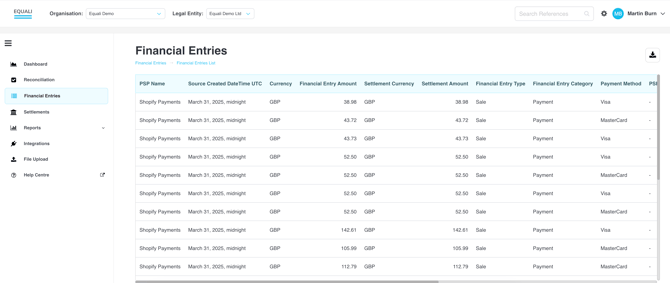
- Step 3: Next, you are taken to a pre-filtered "Financial Entries" page that lists all of the financial entries related to your chosen settlement. Premium subscription customers can download a csv file containing each financial entry by clicking the download icon to the top right of the table.